
- DBeard
- Compare
- TablePlus
Database client comparison
DBeard vs TablePlus
Looking for a TablePlus alternative? Here is how the two differ.
Compare the desktop apps using the databases and workflows you use every day.
The short versionChoose DBeard for PostgreSQL administration or Firestore emulator work on Mac. Choose TablePlus if you need a Windows, Linux or iOS download today.

Tale of the tape
The two, at a glance
| What | DBeard | TablePlusby TablePlus Inc |
|---|---|---|
| Desktop platforms | macOS first, with Linux to follow early. Windows is planned. | macOS, Windows and Linux |
| Mobile access | Desktop app | Native iPhone and iPad app |
| Free use | One open connection and two tabs | Two tabs and two workspace windows. Filter limits vary by platform. |
| Desktop pricing | Founder licence from $69 or $10 monthly | Perpetual licence from $99, with one year of updates |
| SQL review | Stage grid edits and review the generated SQL | Preview pending GUI changes before committing |
A gold bar marks the side with the edge on that row. Checked on 2026-11-20, against TablePlus macOS 27.3.2 (850), Windows 27.3.0 (414), Linux 2.2.2 (324), iOS 27.2.0.
Performance comparison
Benchmark results coming soon.
Feature by feature
What each one can do
“Coming soon” means it is on the DBeard roadmap. “Not planned” means we have decided against it.
| Feature | DBeard | TablePlus |
|---|---|---|
| PostgreSQLDBeard tested PostgreSQL 17. TablePlus engine listings here refer to the Mac app. | Yes | Yes |
| MySQL and MariaDB | Yes | Yes |
| SQLite | Yes | Yes |
| DuckDBDBeard has tested local files. | Yes | Yes |
| ClickHouseDBeard tested local HTTP without a password. Authenticated servers, TLS and cloud service access remain unverified. | Partial | Yes |
| RedisDBeard tested local access without authentication or TLS. | Partial | Yes |
| Microsoft SQL ServerDBeard implements SQL Server. Real-server verification is pending. | Partial | Yes |
| FirestoreDBeard tested the emulator. Firestore is absent from the TablePlus driver list, and support could not be verified. | Partial | Not verified |
| Feature | DBeard | TablePlus |
|---|---|---|
| SQL editor | Yes | Yes |
| Table and column autocomplete | Yes | Yes |
| Query history | Yes | Yes |
| Server-side row filters | Yes | Yes |
| CSV import | Yes | Yes |
| CSV export | Yes | Yes |
| Feature | DBeard | TablePlus |
|---|---|---|
| Inline cell edits for supported SQL engines | Yes | Yes |
| Preview and commit staged GUI edits | Yes | Yes |
| Per-connection query confirmationDBeard calls this Ask first. TablePlus offers Alert Mode and password-based Safe Mode. | Yes | Yes |
| Conflict checks against the original SQL rowTablePlus documents staging and preview. Equivalent stale-row detection could not be verified. | Yes | Not verified |
| Scheduled desktop database jobsDBeard schedules backups. TablePlus documents Schedule Tasks on Mac and Windows. | Yes | Yes |
| Dedicated ClickHouse parts and merges reportsDBeard implements reports for a connected server. Equivalent TablePlus screens could not be verified. | Yes | Not verified |
| Feature | DBeard | TablePlus |
|---|---|---|
| macOS | Yes | Yes |
| Windows download | Coming soon | Yes |
| Linux download | Coming soon | Yes |
| Open a database from a connection URL | Yes | Yes |
| SSH tunnelling with keysDBeard verified local SSH. Remote-server verification is pending. | Yes | Yes |
| PostgreSQL TLS verification and custom CA | Yes | Yes |
Side by side
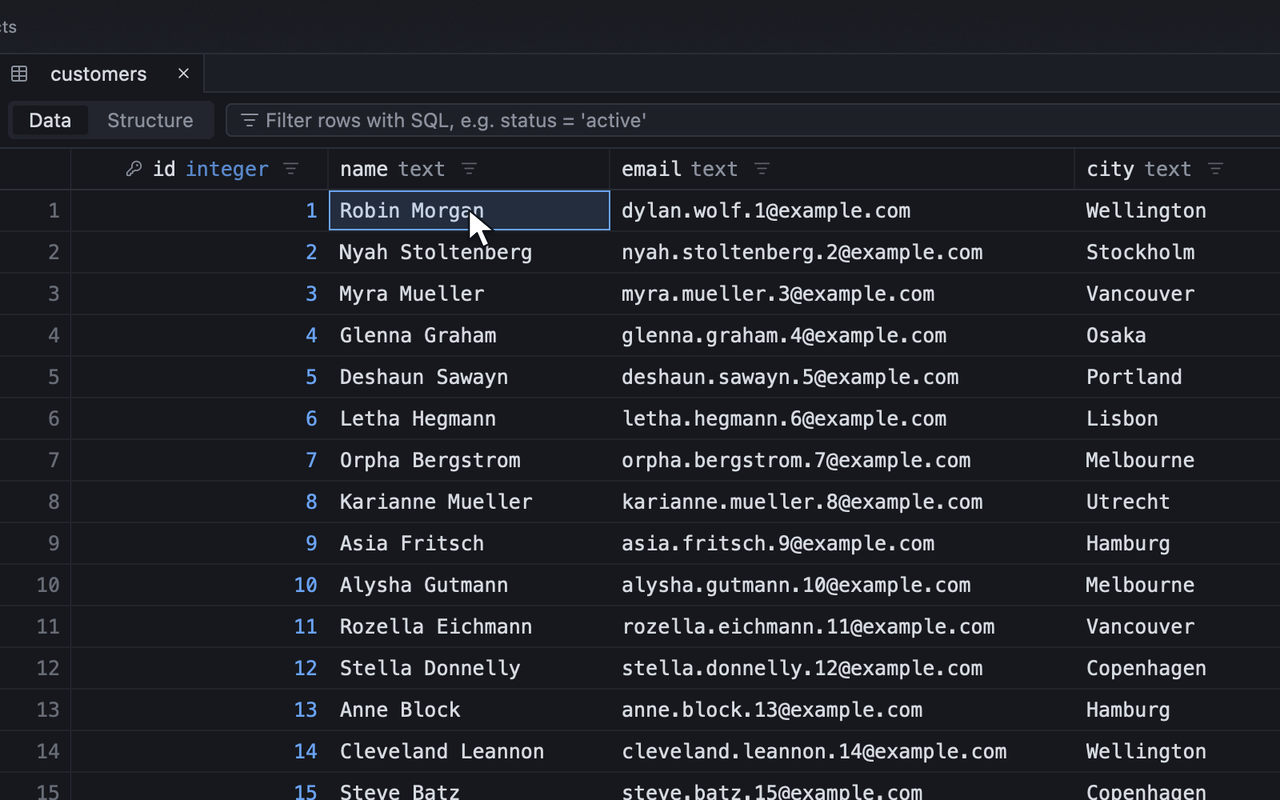
The same job, in both apps

An honest answer
Which one should you pick?
Pick DBeard if
- You want PostgreSQL tools such as a LISTEN/NOTIFY console, client COPY, vacuum and index-usage reports.
- You develop with the Firestore emulator and want to browse collections and edit typed fields in a desktop app.
- You need ClickHouse parts, merges and mutation reports and can start with the tested local HTTP setup.
Stay with TablePlus if
- You need a desktop build for Windows or Linux today, or want to query from an iPhone or iPad.
- Your team already uses TablePlus connection exports, saved queries and Safe Mode settings, and can keep those workflows by staying with it.
- You value a long macOS release history and a perpetual desktop licence with stated prices for renewals and extra seats.
Changing ships
Moving from TablePlus in a few minutes
Re-create one connection
Copy the host, port, database and user into DBeard or use a clean database URL. Enter the password separately. Add SSH and TLS settings in Advanced.
Test with a read-only connection
Open a representative table and run a saved query. Check that roles, schema selection, certificates and the tunnel work before moving more connections.
The longer answer
DBeard and TablePlus, in detail
Compare an ordinary work session
Start with the database you open most often. If it is PostgreSQL, connect both clients to a development database, open a table outside public, and find the columns you need. Write a query with a join, then try a grid edit on a scratch row. Both apps let you preview pending GUI changes as SQL. In TablePlus the preview sits alongside Discard and Commit. In DBeard, the review is part of applying staged edits, and conflict checks can refuse to overwrite a row that has changed since you read it.
The database name on a driver list tells you whether to start looking. The work you do after connecting determines which client fits. DBeard has dedicated PostgreSQL screens for listening to notifications, running client COPY and inspecting vacuum and index usage. For local analytics, try opening a copy of your DuckDB file and locating a macro or inspecting a view. If you use ClickHouse, try the system reports on a local HTTP server first and verify your own authentication and TLS setup before relying on a managed connection.
Check the machines you use
TablePlus has Mac, Windows, Linux and iOS builds. TablePlus notes that engine availability varies by platform, so verify the driver on the machine you will use. DBeard targets macOS first, with Linux to follow early and Windows planned. If you already rely on TablePlus on an iPad or work across Mac and Windows, those builds can matter more than differences in a desktop grid.
For paid use, count the desktops you need to activate and decide how often you want updates. TablePlus prices desktop seats by device and includes a year of updates with a perpetual licence. You can keep using an eligible release when that period ends. Compare the total for your devices with DBeard’s current offers.
Move a single connection first
Use the TablePlus connection settings or its copied connection URL to identify the host, port, database and user. Re-create the connection in DBeard and enter the password there. If a URL contains a password, remove it before sharing it. Check the server certificate, client certificate and SSH jump host separately. Start with a read-only role, run a familiar query and verify that you can see the right schema before you move the rest of your connections.
Questions
Asked before switching
Is there a TablePlus alternative for Mac?
DBeard is a native desktop database client launching on macOS first. It supports PostgreSQL, MySQL, SQLite, DuckDB and other engines, with SQL preview for staged grid edits and a free tier with one open connection and two tabs.
Is there a TablePlus alternative for Windows or Linux?
DBeard targets macOS first, with Linux to follow early. Windows is planned. TablePlus already distributes builds for both platforms. Verify the driver and features you need on the specific platform you use.
Is there a TablePlus alternative for PostgreSQL or DuckDB?
DBeard supports PostgreSQL schema browsing, query editing and reviewed changes, plus local DuckDB files, macros and enum types. PostgreSQL 17 and local DuckDB files are tested.
Is TablePlus free?
You can use the free desktop app indefinitely with limits. TablePlus lists two open tabs and two open workspace windows. It also lists two advanced filters, with advanced filters unavailable on free Windows, and its licensing guide lists one metrics board.
How much does TablePlus cost and how many devices can I use?
The desktop Basic licence costs $99 for one computer, Standard costs $129 for two, and Team starts at three seats at $79 each. These are one-time USD prices before applicable VAT. One year of updates is included. Keep using an eligible build after the year or renew for newer builds.
Does a TablePlus desktop licence unlock the iPhone and iPad app?
TablePlus lists two iOS activations per desktop seat while the licence is within its update period. That means two for Basic and four for Standard.
Can I import TablePlus connections into DBeard?
DBeard’s documented importers cover DBeaver, DataGrip-family IDEs and Navicat. To move from TablePlus, use its Copy as URL option as a reference, or re-enter the host, port, database and username. Enter secrets separately and check SSH and TLS settings.
More database client comparisons coming soon.
Sources
- TablePlus pricing, renewals, desktop seats and iOS activations (tableplus.com), checked 2026-11-20
- TablePlus Docs — licensing and free limits (tableplus.com), checked 2026-11-20
- TablePlus Docs — platforms and supported drivers (tableplus.com), checked 2026-11-20
- TablePlus — desktop and mobile downloads (tableplus.com), checked 2026-11-20
- TablePlus macOS changelog and release history (tableplus.com), checked 2026-11-20
- TablePlus Windows changelog (tableplus.com), checked 2026-11-20
- TablePlus Linux changelog (tableplus.com), checked 2026-11-20
- TablePlus Inc App Store listing — iPhone, iPad and version history (apps.apple.com), checked 2026-11-20
- TablePlus Docs — connection URLs, exports, SSH and TLS (tableplus.com), checked 2026-11-20
- TablePlus Docs — editor, autocomplete, filters and editing (tableplus.com), checked 2026-11-20
- TablePlus Docs — query history and saved queries (tableplus.com), checked 2026-11-20
- TablePlus Docs — CSV import and export (tableplus.com), checked 2026-11-20
- TablePlus Docs — staging, preview and commit (tableplus.com), checked 2026-11-20
- TablePlus Docs — per-connection Alert Mode and Safe Mode (tableplus.com), checked 2026-11-20
TablePlus is a trademark of its owner. DBeard is not affiliated with TablePlus Inc. Spotted a mistake? Tell us and we will correct it.
Try DBeard next to TablePlus.
The free tier opens every engine and every feature, one connection at a time. Keep both installed and decide with your own database.